顯示具有 android學習筆記 標籤的文章。 顯示所有文章

2016年2月23日 星期二

智付寶Android sdk

因為智付寶沒有提供sdk所以自己寫了一個
以智付寶官方API製成
放在Github上,有需要請自取:
https://github.com/lutas2000/Pay2Go-Android-Sdk
下一版將在WebView上加入return button,並編譯成aar
目前只連接MPG API,暫時不會加入其他API

一、申請支付寶帳號

正式網址:https://www.pay2go.com/
測試網址:https://cweb.pay2go.com/
註冊完帳號後在銷售中心開立一個商店
記下以下資訊:商店代號、hashKey、hashIV

二、Import Module

在Android Studio -> File -> new -> Import module選擇pay2go資料夾

加入permission:

<uses-permission android:name="android.permission.INTERNET"/>

三、使用

在Activity中加入:
Mpg mpg = new Mpg(this);
// ============== 必填 =====================
mpg.setAmt(1000); //支付金額
mpg.setItemDesc("商品資訊");
mpg.setLoginType(false); //user是否需要登入支付寶
mpg.setShop("商店代號", "your hashKey", "your hashIV");
mpg.setMerchantOrderNo("自訂訂單編號");
mpg.setEmail("付款者emial");
mpg.setRespondType("JSON");
// ============== 選填 =====================
mpg.setCREDIT(true);
mpg.setWEBATM(true);
mpg.setCVS(true);
mpg.setVACC(true);
mpg.setTest(true); //設定使用test API,不填則使用正式API

mpg.start();

四、執行

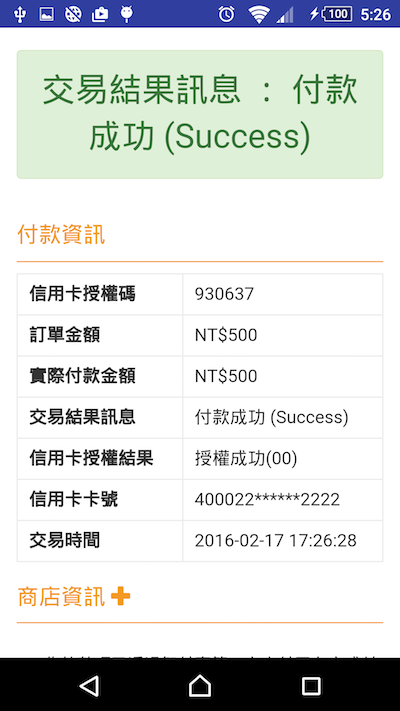
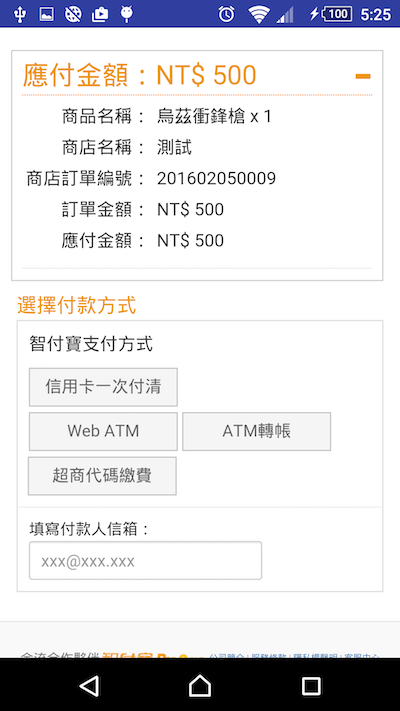
mpg.start()後會自動開啟PayActivity
並載入智付寶支付MPG頁面
image
image

2015年5月15日 星期五

在Android Studio中新增assets資料夾

在專案上點右鍵-> New -> Folder -> Assets Folder


assets資料夾在硬碟中的位置:
  專案\app\src\main\assets

2012年10月18日 星期四

常用的android開發者網站

Android Developer:
Google官方的開發者網站,分為Design(設計),Develop(開發)和Distribute(發佈)三部分,也是app開發流程中的三大步驟。
先在design學習設計界面
Develop中的reference有各種API的詳解
最後再看Distribute

eoe:
大陸的android開發者論壇,有相當多會員和討論串。

android中文翻譯組:
有中文的API翻譯,英文苦手用...

蛙齋:
想在app中放廣告的話可以來這看看,有Admob和台灣兩大行動廣告商KuAD和Vpon的詳細設定方法


2012年9月18日 星期二

EditText:修改虛擬鍵盤的Enter鍵

一般EditText在輸入時虛擬鍵盤上的Enter鍵都預設為"換行" 那要如何改變為其他種類的按鍵呢? 首先在layout檔中加入android:imeOptions屬性


  1. <EditText  
  2.     android:id="@+id/edit_text"    
  3.     android:layout_width="fill_parent"   
  4.     android:layout_height="wrap_content"  
  5.     android:imeOptions="actionDone"
  6.     android:singleLine="true"
  7. /> 


第5行:
輸入enter鍵的種類,有:

actionUnspecified 未指定
actionNone 無動作
actionGo 前往
actionSearch 搜尋
actionSend 發送
actionNext 下一個
actionDone 完成
詳見http://developer.android.com/reference/android/view/inputmethod/EditorInfo.html

第6行:
將EditText改為單行輸入
否則仍然會是換行鍵
在Activity為EditText加入OnEditorActionListener

  1. editText.setOnEditorActionListener(new OnEditorActionListener() {  
  2.             @Override  
  3.             public boolean onEditorAction(TextView v, int actionId, KeyEvent event) {  
  4.                 //按下完成鍵要執行的動作
  5.                 return false;  
  6.             } 

2012年7月13日 星期五

ADK的安裝程式偵測不到JDK

最近因為重灌電腦要重裝ADK
卻遇到了一個老問題:JDK not found


以往的解決方式是按back再按next就可以了
不過新版的卻行不通@@(我用的是JDK1.7.0_02和ADK r20)

新的解決方法是(win7):
1.在我的電腦上按右鍵->內容->進階系統設定->進階->環境變數
2.在系統變數欄按'新增',變數名稱填JAVA_HOME
3.變數值填入JDK的位置
注意若路徑中包含Program Files要改成Progra~1
(64位元的改法:
Progra~1 = 'Program Files'
Progra~2 = 'Program Files(x86)' )例:C:\Progra~1\Java\jdk1.7.0_02
4.再按確定之後就能順利安裝了!

2012年1月16日 星期一

windows上安裝android開發環境

1.下載開發軟體
   JDK
      記得要先選"Accept License Agreement"才能開始下載
      下載Windows x86或Windows x64的檔案
   Eclipse
      下載Eclipse IDE for Java Developers
    Android SDK
      點擊Download the SDK for Windows

2.安裝軟體
   JDK
       一路點下一步...
   Android SDK
      安裝完後先開啟 Android SDK Manager
      勾選要安裝的package

   Eclipse
      解壓縮完打開eclipse.exe
      [Help] -> [Install New Software] -> Work with 填入 http://dl-ssl.google.com/android/eclipse/site.xml -> add ->select all -> Next